
Still Logging Temperatures Manually? Automate Records with ETI Probe & Virtual Helpdesk
The Hidden Cost of Manual Temperature Records
Temperature monitoring is critical across countless industries and for a variety of safety reasons. Yet many organisations still rely on manual temperature logging. Technicians visit equipment, jot down readings, transcribe them into spreadsheets and upload to dashboards hours or days later.
The results? Inconsistent data. Human errors. Compliance gaps. Wasted labour.
But there is a better way.
Introducing the ETI Probe + Virtual Helpdesk Solution
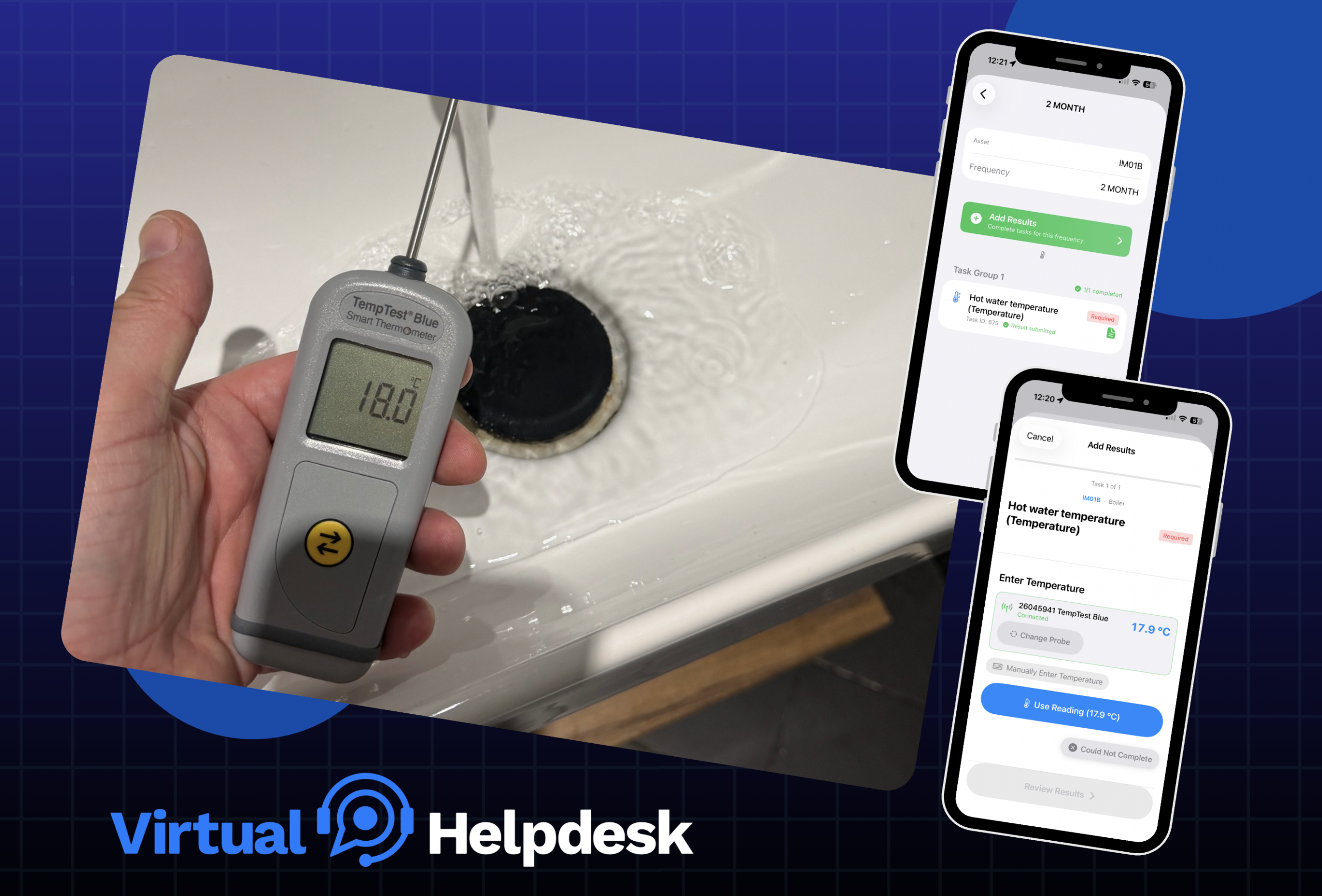
Imagine recording every critical temperature directly into your phone, with data flowing automatically into your asset management dashboard. No spreadsheets. No manual entry. No delays.
The ETI Probe is a precision RTD (Resistance Temperature Detector) sensor built for wireless reliability. Paired with Virtual Helpdesk’s asset management system, it creates a seamless automated workflow that captures temperature data in real time and routes it directly to your centralised dashboard.
Here is how it works:
1. Connect via Bluetooth
The ETI Probe links wirelessly to your mobile app. No cables, no base stations and no complex setup. Technicians carry a single device that pairs with multiple probes instantly.
2. Real-Time Data Capture
As soon as a reading is taken, it is transmitted to the app. No waiting and no transcription errors. The data is timestamped, logged and ready for analysis.
3. Automatic Dashboard Updates
Virtual Helpdesk ingests the data automatically. Your asset management dashboard updates in real time, giving you a live view of every monitored location’s temperature status.
4. Compliance & Reporting
Historical records are maintained automatically. Generate compliance reports in seconds. Audit trails are built in. Regulatory requirements such as food safety, pharmaceutical storage, water safety management and HVAC monitoring are met effortlessly.
The Three Problems It Solves
1. Eliminates Time Waste
Manual temperature logging is repetitive and time consuming:
- Recording by hand or voice note
- Returning to the office to input data
- Verifying and correcting transcription errors
With ETI Probe automation, a technician spends 2 to 3 minutes per location instead of 4 to 5. For a facility with 100 locations checked weekly, that is 6 hours saved per month.
2. Removes Human Error
Handwritten temperatures are prone to misreading, transcription mistakes and data entry errors. A single digit transposed, for example 22°C recorded as 32°C, can trigger false alarms, unnecessary investigations or worse, undetected equipment failures.
With ETI Probe automation, data flows digitally from sensor to dashboard with zero manual intervention. What is recorded is exactly what was measured.
3. Ensures Compliance & Accountability
Regulatory bodies increasingly demand digital records with unbroken audit trails:
- Food safety standards such as FSMA, BRC and IFS
- Pharmaceutical storage including GDP and FDA
- Laboratory accreditation such as ISO 17025
- HVAC documentation
Manual logs are difficult to verify and easy to challenge. Automated records with timestamps and digital signatures are far more defensible.
With Virtual Helpdesk, every temperature reading is logged with a precise timestamp, device ID and location metadata. Compliance reports generate automatically and your audit trail is secure.
Why Virtual Helpdesk + ETI Probe Beats the Alternatives
Many organisations try piecemeal solutions. This might include standalone IoT sensors that sync to generic cloud storage, or thermometers that log to proprietary apps disconnected from asset management.
Virtual Helpdesk integrates ETI Probe data directly into your asset management workflow. This means:
- No duplicate systems. One dashboard for assets, incidents, maintenance and temperature data
- Smarter automation. Rules that trigger alerts, work orders or escalations based on thresholds
- Better visibility. Link anomalies to specific assets, identify patterns and predict failures
- Faster response. When a temperature alert fires, it is already in your ticketing system
Getting Started: A Simple 4-Step Implementation
Step 1: Deploy ETI Probes
Provide probes to your technicians. Each is independently powered and Bluetooth enabled.
Step 2: Pair via Mobile App
Technicians download the Virtual Helpdesk mobile app and pair it with probes via Bluetooth. This takes seconds per device.
Step 3: Start Logging
Begin taking readings. Data flows automatically to your dashboard. Set alert thresholds and configure reports.
The Bottom Line
Manual temperature logging is a legacy process that does not belong in modern asset management. The combination of ETI Probe hardware and Virtual Helpdesk’s integrated platform creates an effortless, accurate and compliant system for continuous monitoring.
You remove the effort. You eliminate the errors. You gain real-time visibility into critical assets.
Ready to automate your temperature records? Virtual Helpdesk asset management makes it simple. Start with a single location, scale across your facility and reclaim the hours lost to manual logging.
Related Resources
- Virtual Helpdesk Asset Management Dashboard
- ETI Probe Specifications & Ordering
- Temperature Monitoring Best Practices Guide
- Asset Management for Regulated Industries
Ready to transform your temperature monitoring?
Get in touch with Virtual Helpdesk today for a free consultation on integrating ETI Probes into your asset management workflow. See the time savings and accuracy improvements firsthand.

Let’s Get Started
Smart Facility Management Starts Here
Take control of your facilities with Virtual Helpdesk’s innovative CAFM solution. From compliance to maintenance, we’ve got you covered.
Location
info@virtual-helpdesk.com
Franklins House, Wesley Lane, Bicester, OX26 6JU

Subscribe
Keep up to date with our latest product releases and news.